notes
Claude Code Best Practices
- Prompting Fundamentals
- Plan Mode
- Context Management
- CLAUDE.md Configuration
- Skills
- Subagents
- Hooks
- Commands
- MCP Integration
- LSP Servers
- Permission Modes
- CI/CD and Headless Mode
- Git Worktrees for Parallel Development
- Token Optimization
- Prompt Examples
- Anti-Patterns to Avoid
- Best Practices Summary
- References
Prompting Fundamentals
Be Specific and Contextual
Ineffective:
fix this code
Effective:
Fix the memory leak in the user authentication service by properly closing database connections
With context:
Implement a user profile page that matches our existing UI style in `src/components/auth/`
and integrates with the `userService` in `src/services/`.
Step-by-Step Instructions
For complex tasks, break them into steps:
Refactor the authentication system:
1) Identify all authentication-related files
2) Analyze the current implementation
3) Suggest a cleaner architecture
4) Implement the changes one file at a time
XML Tags for Structure
Use XML tags for complex prompts:
<instructions>
Review this code for security vulnerabilities
</instructions>

<example>
Check for SQL injection, XSS, and authentication bypasses
</example>

<formatting>
Return findings in a markdown table with severity ratings
</formatting>
Plan Mode
Press Tab to activate Plan Mode - Claude analyzes and plans without making changes.
- Enable Ultrathink for deep solution thinking
- Use Plan Mode to review the proposed approach
- Confirm and implement the plan
Best for:
- Complex architectural decisions
- Performance optimization
- Unfamiliar codebase analysis
- Security audits
Context Management
Claude code is only as good as context you give to it.
Context Commands
| Command | Description |
|---|---|
<esc> + <esc> |
Rewind conversation to earlier point |
/compact |
Summarize conversation and continue |
/clear |
Clear context for new task |
/context |
Show current context usage |
File References with @
# Reference a single file
> Explain the logic in @src/utils/auth.js

# Reference a directory
> What's the structure of @src/components?

# Multiple files
> Compare @file1.js and @file2.js for consistency

# Specific lines
> @src/api/users.ts:50-100
Context Optimization Strategies
- Monitor Usage: Check
/contextregularly - Strategic Clearing: Use
/clearbetween unrelated tasks - Compaction: Use
/compactfor long sessions - Sub-Agent Delegation: Offload focused tasks
CLAUDE.md Configuration
Hierarchical Structure
~/.claude/CLAUDE.md           # Global preferences (all projects)
~/project/.claude/CLAUDE.md   # Project-specific instructions
~/project/src/.claude/CLAUDE.md  # Subsystem-specific context
Recommended Template
# Project Name

## Project Description
Brief overview of your project's purpose.

## Tech Stack
- Frontend: [Technologies]
- Backend: [Technologies]
- Database: [Technologies]

## Code Conventions
- [Coding standards]
- [Naming conventions]
- [Styling guidelines]

## Development Commands
- Start: [Command]
- Test: [Command]
- Build: [Command]

## Project Structure
- @docs/src/CLAUDE.md
- @docs/tests/CLAUDE.md

## Important Notes
- [Specific instructions]
CLAUDE.md Guidelines
| Guideline | Description |
|---|---|
| Keep Focused | Each file addresses a single concern |
| Be Specific | Provide clear, actionable instructions |
| Use Descriptive Names | api-validation.md not rules1.md |
| Regular Updates | Review as project evolves |
| Use references | Reference other CLAUDE.md in main CLAUDE.md |
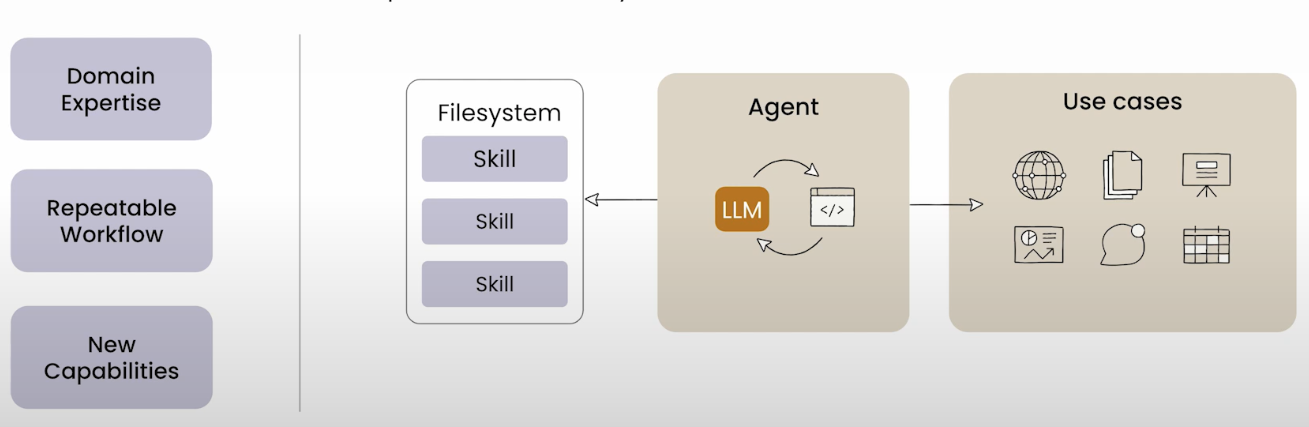
Skills
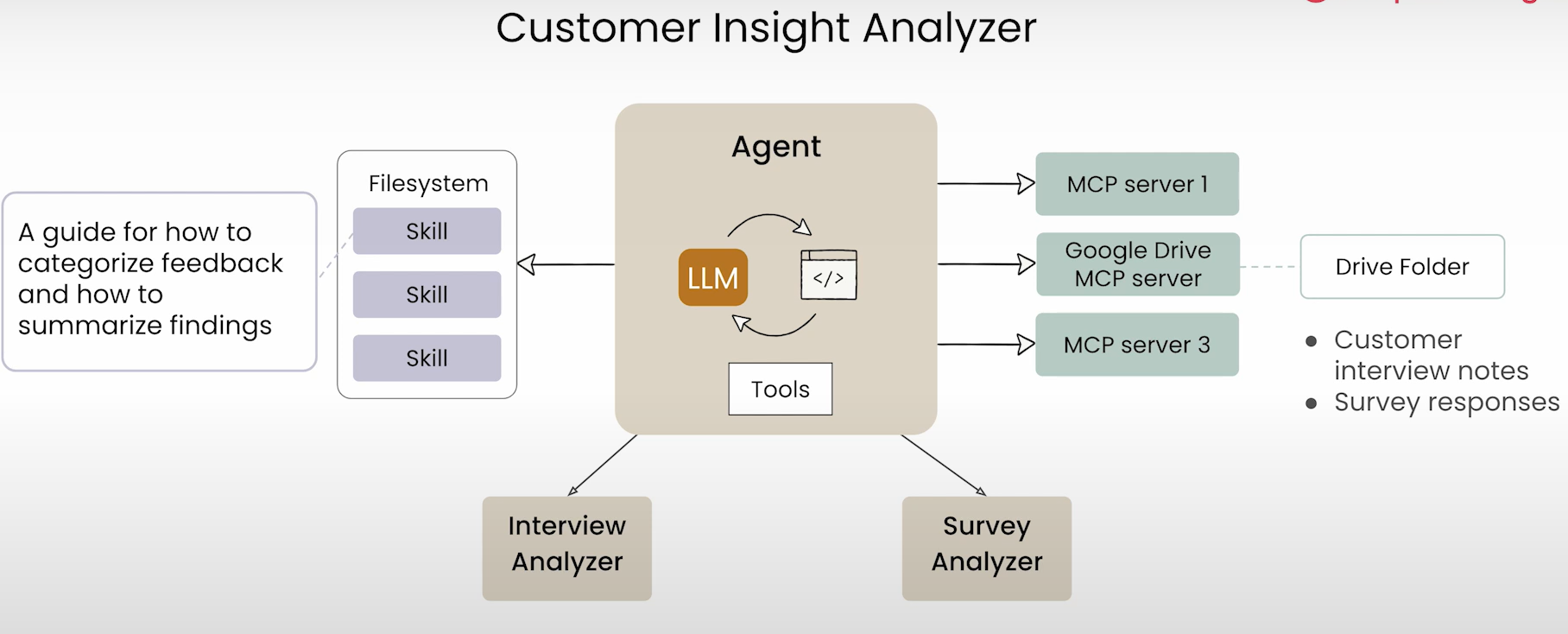
Why
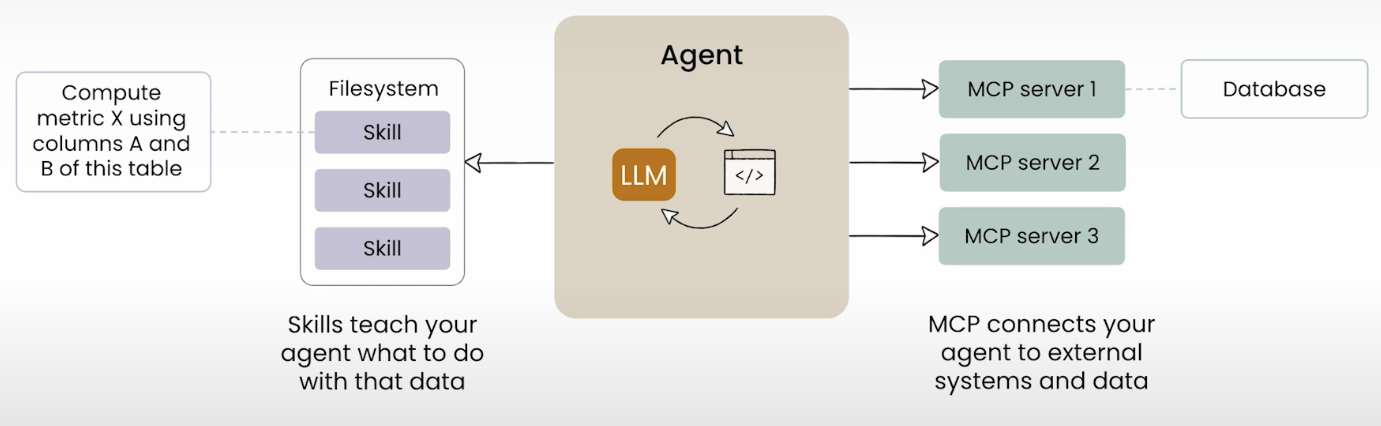
Skills vs MCP
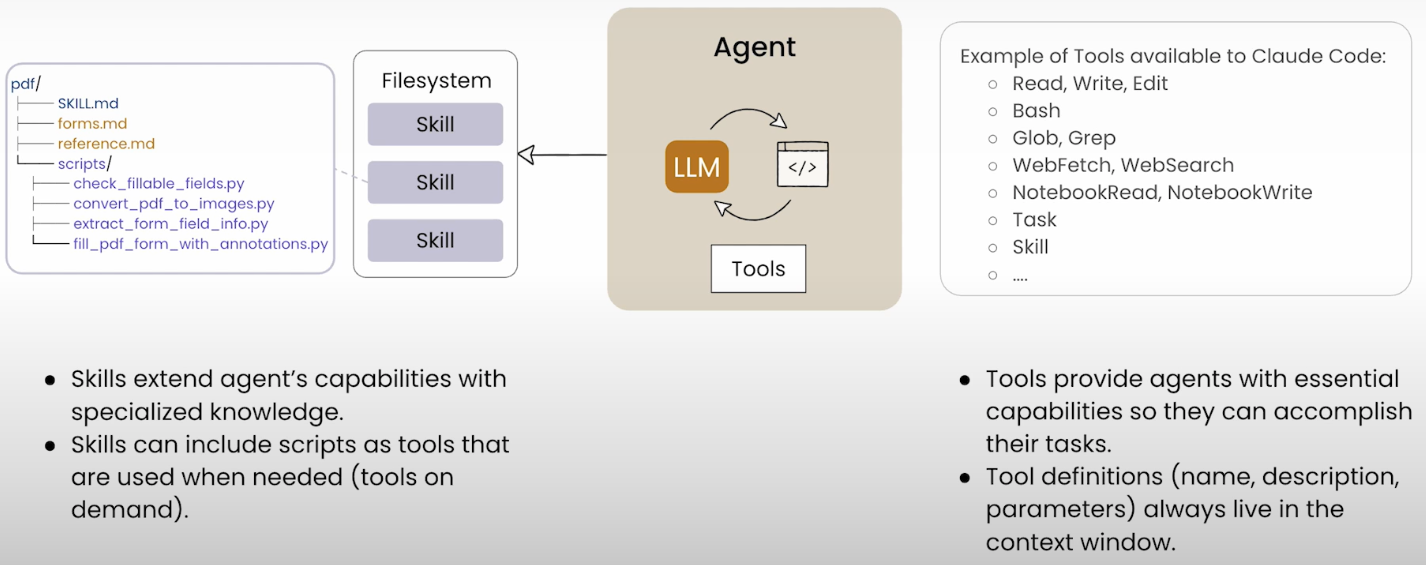
Skills vs Tools
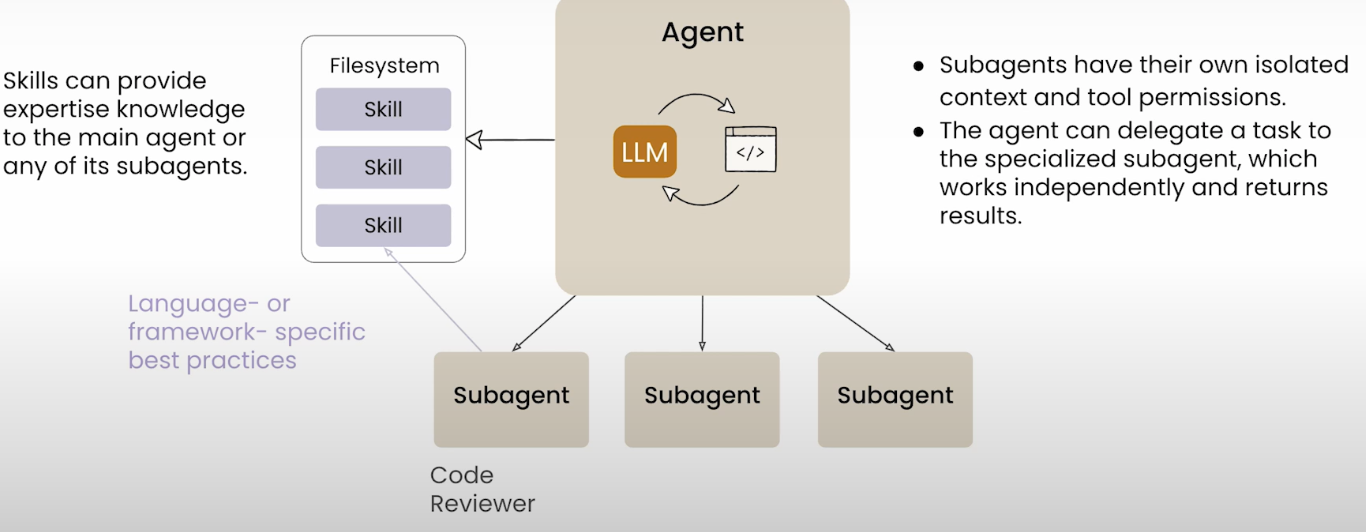
Skills vs SubAgents
All Together
Resources
Subagents
Delegation Patterns
Tell Claude to use subagents for parallel work:
Use 3 sub-agents to analyze these files:
1. Security analysis of auth.ts
2. Performance review of cache system
3. Type checking of utils.ts
Execution Modes
| Mode | Description | Use Case |
|---|---|---|
| Parallel | Independent tasks | No dependencies |
| Sequential | Dependent tasks | Results feed next step |
Workflow Patterns
Sequential Workflow:
- Architecture planning
- Implementation
- Testing
- Security review
- Documentation
Parallel Workflow: Multiple subagents on independent tasks simultaneously.
Hooks
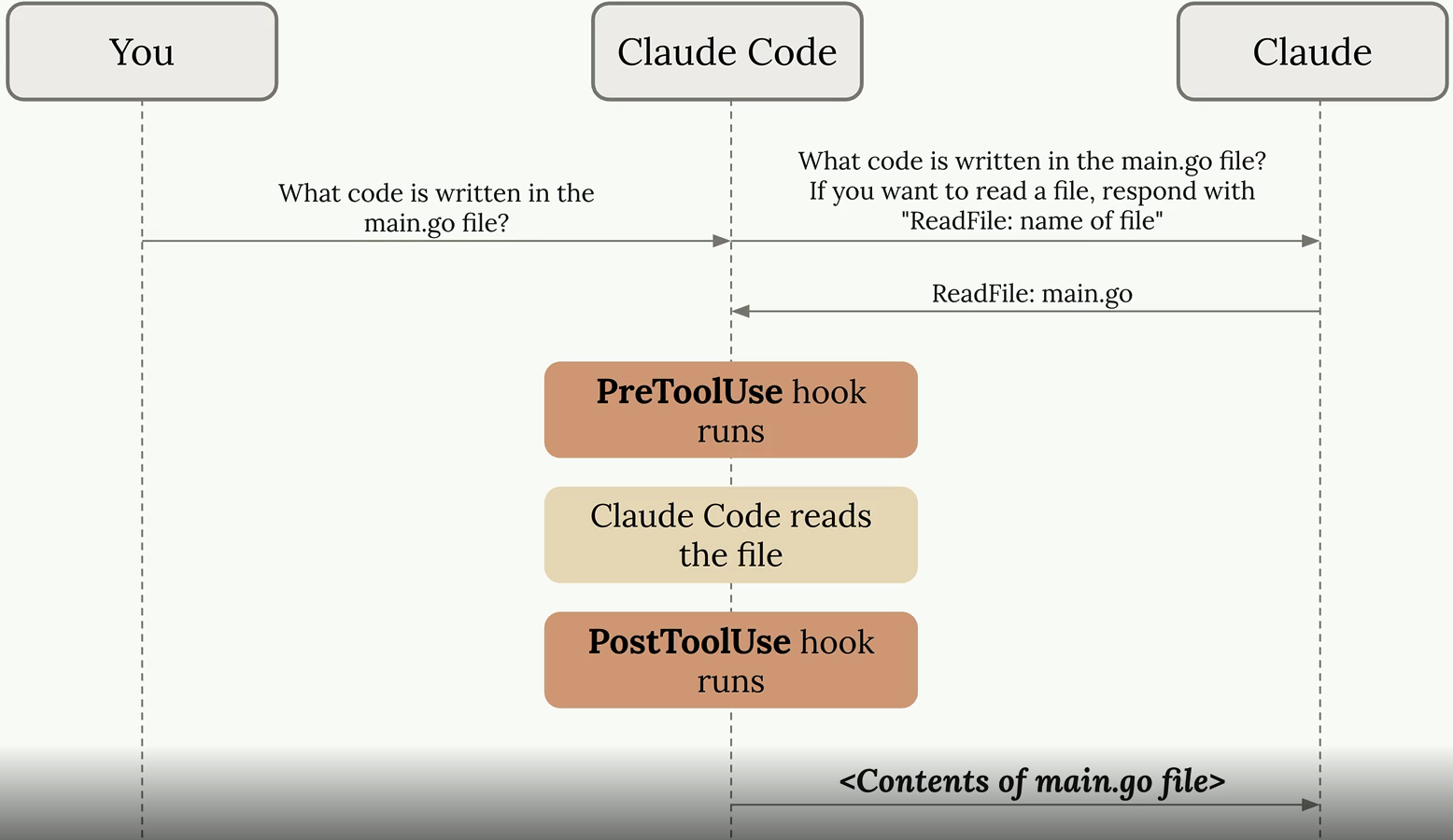
Hooks are shell commands that execute in response to events.
Use Cases
- Run code formatter after Claude edits a file
- Block Claude from editing/reading particular files
- Run tests automatically after file changes
- Block deprecated function usage
Hook Flow
Hook Types
| Hook Type | Trigger | Use Case |
|---|---|---|
PreToolUse |
Before tool runs | Validation, logging |
PostToolUse |
After tool completes | Cleanup, notifications |
Notification |
Claude notifications | Alerts |
Stop |
Claude finishes | Final actions |
SubagentStop |
Subagents complete | Coordination |
Configuration Levels
- Project-Level:
.claude/settings.json(shared) - User-Level:
~/.claude/settings.json(personal) - Local Project:
.claude/settings.local.json(not shared)
Configuration Example
{
  "hooks": {
    "PreToolUse": [
      {
        "matcher": "Edit",
        "hooks": [
          {
            "type": "command",
            "command": "echo 'File being edited' >> ~/claude-ops.log"
          }
        ]
      }
    ]
  }
}
Check available hooks with /hooks command.
Commands
Creating Commands
Create Markdown files in .claude/commands/ (project) or ~/.claude/commands/ (personal).
Example - deploy.md:
---
description: Deploy application to staging environment
---

Please perform a production-ready deployment:
1. Run all tests and ensure they pass
2. Build the application for production
3. Run security checks and linting
4. Deploy to staging environment
5. Verify deployment health checks
6. Provide deployment summary
Arguments and Placeholders
---
argument-hint: [issue-number] [priority]
description: Fix a GitHub issue
---

Fix issue #$1 with priority $2.
Check the issue description and implement the necessary changes.
Invoke with: /fix-issue 123 high
Bash Integration
---
allowed-tools: Bash(git add:*), Bash(git status:*), Bash(git commit:*)
description: Create a git commit
---

## Context
- Current status: !`git status`
- Current diff: !`git diff HEAD`

## Task
Create a git commit with appropriate message based on the changes.
MCP Integration
Model Context Protocol (MCP) connects Claude Code to external tools and data sources.
Configuration
{
  "mcpServers": {
    "github": {
      "command": "npx",
      "args": ["-y", "@modelcontextprotocol/server-github"],
      "env": {
        "GITHUB_TOKEN": "${GITHUB_TOKEN}"
      }
    }
  }
}
Practical Applications
"Add the feature described in JIRA issue ENG-4521 and create a PR on GitHub."
"Check Sentry and Statsig to check the usage of the feature."
"Find emails of 10 random users from our Postgres database."
"Update our email template based on the new Figma designs posted in Slack."
LSP Servers
Configure LSP servers for better code intelligence:
Permission Modes
| Mode | Activation | Description |
|---|---|---|
| Normal | Default | Prompts for each action |
| Plan Mode | Tab |
Analyzes without changes |
| Auto-Accept | Shift+Tab |
Auto-approves file edits |
| YOLO Mode | --dangerously-skip-permissions |
Bypasses all prompts |
Security Note: Use Auto-Accept and YOLO modes only in controlled environments.
CI/CD and Headless Mode
Headless Execution
claude -p "Your prompt here" --allowedTools "Bash,Read" --permission-mode acceptEdits
Key Flags:
-p/--print: Non-interactive mode--allowedTools: Specify permitted tools--output-format: Set output format (text, json, stream-json)
GitHub Actions Example
name: AI Code Review

on:
  pull_request:
    paths:
      - '**/*.js'
      - '**/*.ts'

jobs:
  review:
    runs-on: ubuntu-latest
    steps:
      - uses: actions/checkout@v2
      - name: Run Claude Code Review
        run: |
          claude -p "Review this PR for code quality" --allowedTools "Read,Glob,Grep"
Git Worktrees for Parallel Development
Run multiple Claude Code sessions on different branches:
# Create worktrees for parallel development
git worktree add ../project-feature-a -b feature-a
git worktree add ../project-feature-b -b feature-b

# Run Claude Code in each worktree
cd ../project-feature-a && claude
cd ../project-feature-b && claude
Benefits:
- Independent file state per worktree
- Changes don’t affect other worktrees
- Shared Git history and remote connections
Merging Worktree into Target Branch
# 1. Commit all changes in the worktree
cd ../project-feature-a
git add . && git commit -m "Complete feature A"

# 2. Push the branch to remote (optional, for PR workflow)
git push -u origin feature-a

# 3. Switch to main repository and merge
cd ../project
git checkout main
git merge feature-a

# 4. Clean up: remove the worktree and branch
git worktree remove ../project-feature-a
git branch -d feature-a
Alternative: Squash merge for cleaner history:
git merge --squash feature-a
git commit -m "Add feature A"
Token Optimization
Prompt Caching
- Cache Duration: 5 minutes after last use
- Minimum Size: 1,024 tokens
- Cost: 25% premium for writes, 10% for reads
Cost Reduction Strategies
| Strategy | Description |
|---|---|
| Selective File Reading | Specify only necessary files |
| Use Grep Before Read | Search to identify relevant files |
| Targeted Mentions | Use specific file/line references |
| Limit Output Verbosity | Request concise outputs |
| Batch Operations | Combine related tasks |
Prompt Examples
Brainstorm and Plan
Propose a few fixes for issue #123, then implement the one I pick

Identify edge cases not covered in `@app/run.py`, then update tests. think hard

Use 3 parallel agents to brainstorm ideas for cleanup of `@services/xxx.cpp`
Git Operations
commit, push, pr

Check why this function changed, use git history
Anti-Patterns to Avoid
| Anti-Pattern | Problem | Solution |
|---|---|---|
| Too many options | Confuses users | Provide clear default |
| Testing mock behavior | Unreliable tests | Test actual behavior |
| Not encoding intent upfront | Misaligned results | Define standards clearly |
| Vague instructions | Ambiguous outputs | Be specific and actionable |
Best Practices Summary
- Write good code (SOLID and DDD principles)
- Plan in advance (use Plan Mode for complex tasks)
- Give Claude iteration methods (unit tests, success/failure criteria)
- Be specific in prompts (file paths, context, expected outcomes)
- Use hierarchical CLAUDE.md files for consistent context
- Leverage subagents for parallel work
- Enable extended thinking (ultrathink) for complex reasoning
- Manage context proactively (
/compact,/clear,/context) - Practice TDD - let Claude write tests first
References
Official Documentation
- Anthropic Claude Code Best Practices
- Common Workflows
- Anthropic Prompt Engineering Guide
- Claude Code Setup Guide
- Claude Code MCP Integration
- Claude Code Slash Commands
- Claude Code Subagents
- Claude Code Headless Mode